See your wiki as a living 3D brain
Each page is a neuron, each link a synapse. LLM Wiki Brain turns your Obsidian vault into a brain you can rotate, search, filter and replay, and shows how information flows from the index to every page.
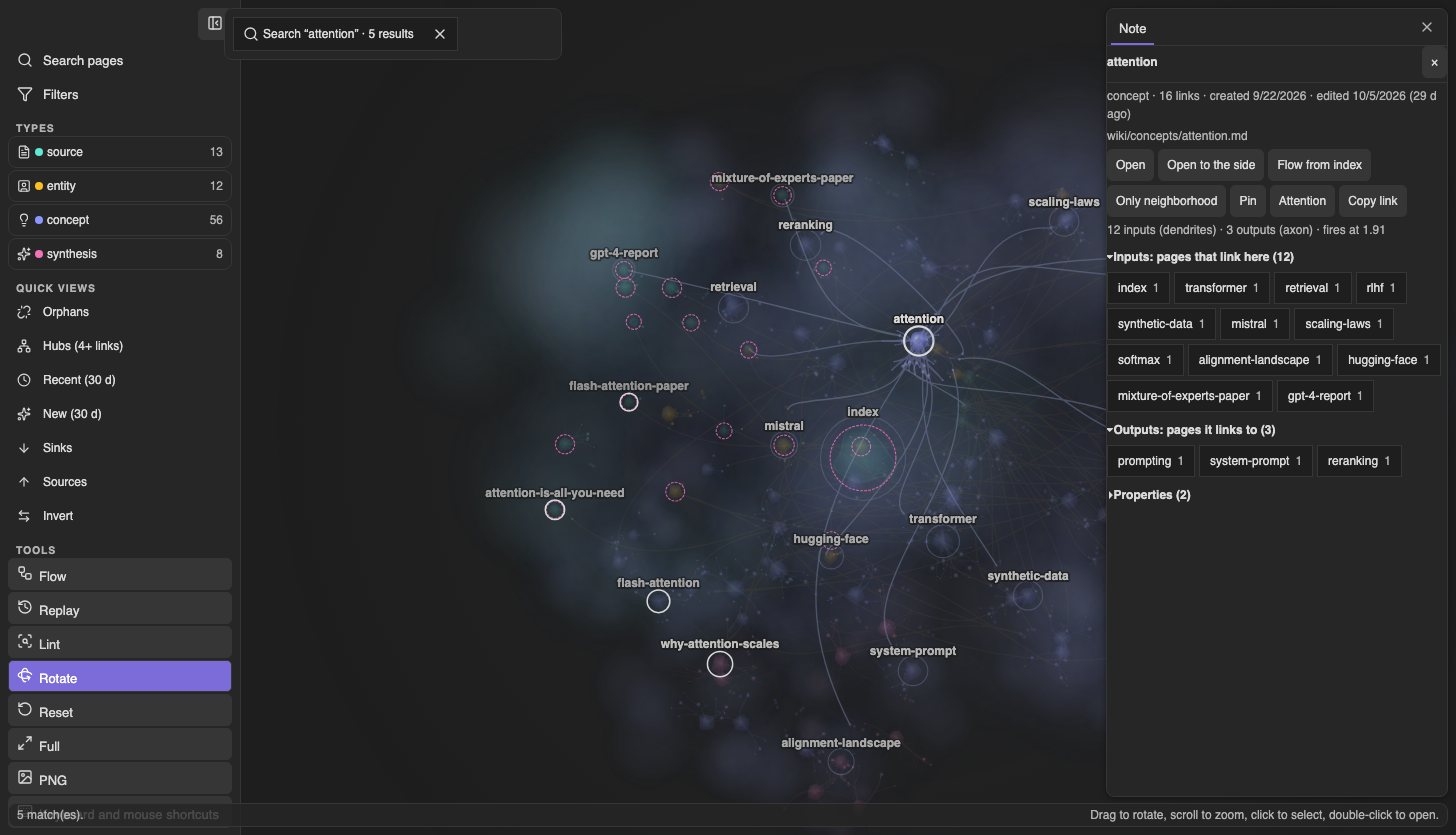
The plugin's own view on a demo vault: the labelled rail, a search that folded into a pill while it still filters, and a selected page with its inputs and outputs, and how strong each link is, in the drawer.
Try it
The real plugin, running in your browser
This is the plugin's own view and engine on a made-up LLM wiki. Press Flow to send information from the index to every page, drag to rotate, click a neuron, open the search from its icon and type.
Tip: Alt+drag selects an area, ? lists the shortcuts. The demo notes are made up; your own notes never leave your machine.
The interface
Easy to find your way
Every control has a label, each filter lives in one place and nothing relies on colour alone. On your first visit a three-step tour shows where Search, Filters and Flow are.
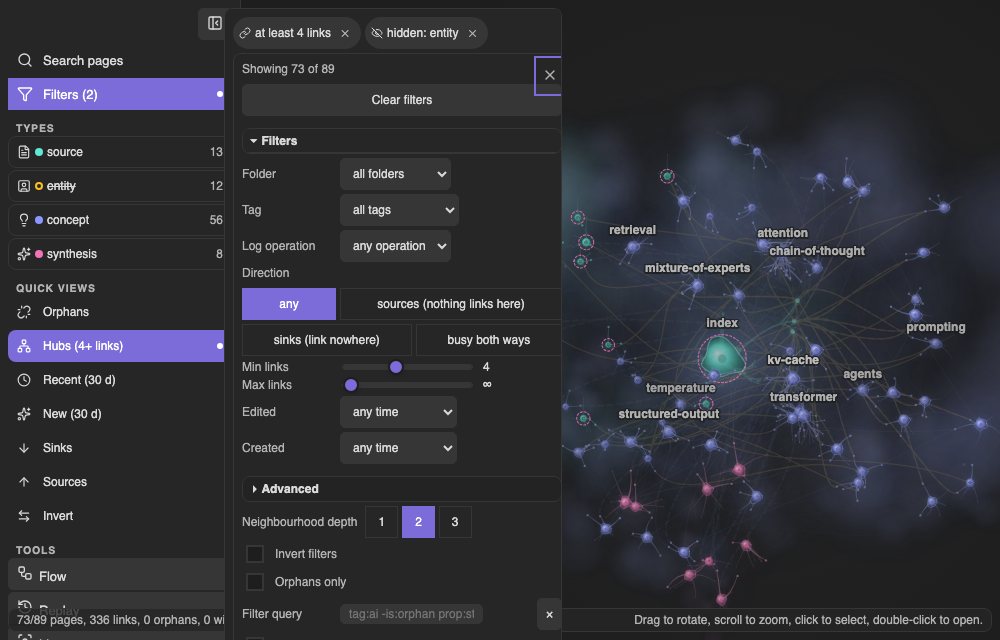
Filters, counted and clear
The Filters button shows how many are on, chips remove them one by one, and a line says how many pages are left.
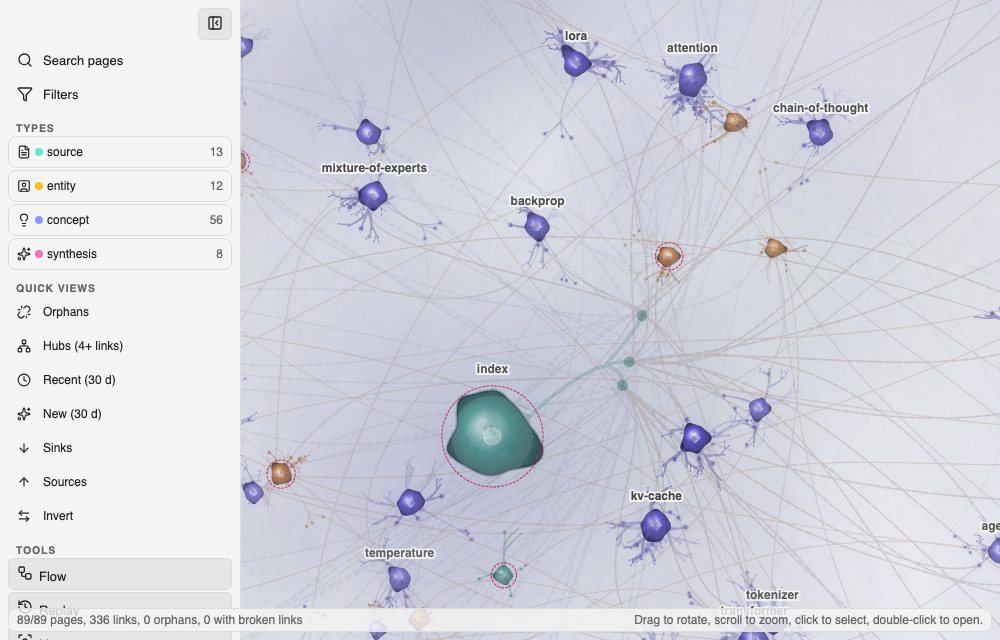
Light and dark, branching and marked
Branching dendrites, a mark inside each neuron for its page type, and colours that follow your theme. A colour-blind safe palette is one setting away.
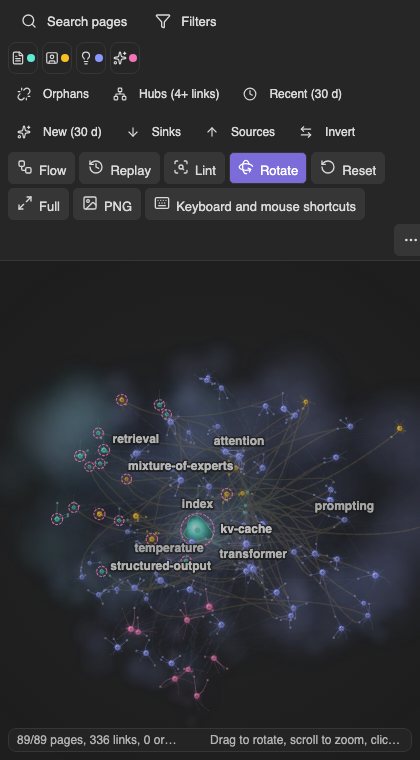
Any pane size
In a narrow pane the rail becomes a top bar and the panels become sheets at the bottom. Buttons are 44 px on touch.
What it does
A living picture of your wiki
Built for LLM wikis (sources, entities, concepts, syntheses, an index and a log) and useful on any vault.
A brain made of your notes
Linked pages share a region of the brain. A soft cloud shows its volume and the neurons fill it, from ten pages to ten thousand. Links and axons are 3D curves that turn with the brain, and far cells melt into the background.
Flow: information reaches every page
A wave leaves the index and crosses the links hop by hop, with rings, comets and glowing links, and a counter of the pages reached.
Replay the wiki growing
Watch the pages return in creation order, with what the log recorded each day, a scrubber, speed and loop.
Search and Ask
Open the search from its icon and type: words, tag:, links:>3, edited:<7d, is:orphan, regex. Enter walks the matches, Ctrl/Cmd+Enter asks and the answer spreads along the links. The box folds away by itself and leaves a pill while it still filters.
Filters you can see
One home for each filter: quick views in the rail, the switches in the Filters panel, a button that counts what is on, and a line that says "Showing 12 of 214 pages" with a way to clear. Saved views, and a view that reopens as you left it.
Select, isolate, export
Select a group by click, area or lobe; isolate it, copy it as links, turn it into an Obsidian Canvas, or save the view as a PNG.
Lint what is broken
Orphans, broken links and untyped pages get a ring and a clickable list, so the wiki stays healthy.
Fast and private
Canvas 2D, no network, no telemetry. The biggest cells on screen get full neurons whatever the vault size and the rest are sprites; the detail adapts to your frame rate.
Four languages
English, Portuguese (Brazil), Spanish and French, following Obsidian's language.
Neurons that look alive
Branching dendrites, an axon that points at the pages it links to, thicker links when they are stronger, a sheath on the busy roads between hubs, and a dim moment after a page fires.
Works at any size
A labelled rail that folds on its own in a narrow pane, one drawer for notes, lint and help, and a three-step tour that shows where things are.
Easy on every eye
Light and dark themes, a colour-blind safe palette, type marks that do not depend on colour, keyboard navigation and screen reader labels.
How it works
From a vault to a brain
Everything is derived from what Obsidian already knows.
- Your vaultNotes,
[[links]], tags, frontmatter,wiki/log.md - A directed graphA link leaves the page that holds it and lands on the page it points to
- A neuron modelPages add up inputs, fire at a threshold, learn and fade
- The brainLobes, dendrites, axons and a wave you can watch
The analogy
The neuron model
The picture follows the biology, so what you see says something about your wiki.
| Biology | In the plugin |
|---|---|
| Dendrites | Inputs: the pages that link to this one |
| Axon | Outputs: the links this page contains |
| Synaptic strength | How often a link is repeated, drawn as thickness; links used together grow stronger and fade when idle |
| Firing threshold | A page fires all-or-nothing when the charge it received reaches a threshold that grows with its inputs; the arc around it shows how close it is |
| Inhibition | A contradicts: link in the frontmatter lowers the target's charge; its spikes are red |
| Myelin | Links between busy pages conduct faster, in jumps, and wear a faint sheath with gaps |
| Attention | Pages that are similar but not linked light up for a moment, with weights |
| Refractory period | A page that just fired dims for a moment and ignores new input; an inhibited page gets a cold dashed ring |
| Dendritic tree | Big cells grow branching dendrites; each page type also has a mark (dot, square, diamond, triangle), so it reads without colour |
Search syntax
Ask your wiki
One search box filters, highlights and asks. Enter walks the matches; Ctrl/Cmd+Enter asks: the answer spreads along the links.
| Syntax | Meaning |
|---|---|
attention cache | Every word must appear in the name, path, headings or tags |
tag:ai or tag:ml | Either side may match |
-type:source | Exclude a term |
links:>3 | Number of links |
edited:<7d created:>2026-01-01 | Age or date |
prop:status=draft | Frontmatter property: equals, contains, exists |
is:orphan is:broken is:hub | Page state: orphan, broken, untyped, index, log, hub |
to:attention from:index | Links to a page / is linked from a page |
/kv-?cache/ | Regular expression |
Use it
Commands and shortcuts
Commands
- Open brain view
- Ask the brain
- Send information from the index to every page
- Replay the wiki growing in creation order
- Run wiki lint overlay
- Focus the search box
- Clear filters and search
- Save the view as an image
- Make a canvas from the selection
Keyboard and mouse
- Drag rotate · Shift+drag pan · wheel zoom
- Click select · Cmd/Ctrl+click add · Alt+drag select an area
- 1 2 3 front, top, side · 0 reset
- n / p next or previous hub · Alt+arrows hop to a neighbour
- Enter open · Cmd/Ctrl+Enter open to the side · Esc clear
- ? lists every shortcut · right-click for a menu
- F filters panel · Shift+F full screen · Cmd/Ctrl+Enter in the search asks the brain
Install
Get LLM Wiki Brain
The plugin is not in the Obsidian community directory yet. Install it with BRAT or by hand.
- BRAT (beta): in Obsidian, install the BRAT plugin, run BRAT: Add a beta plugin and enter
jonyfs/llm-wiki-brain. - By hand: download
main.js,manifest.jsonandstyles.cssfrom the latest release into<vault>/.obsidian/plugins/llm-wiki-brain/. - Enable LLM Wiki Brain in Settings → Community plugins, then click the brain icon in the ribbon.
FAQ
Questions
Does it send my notes anywhere?
No. The plugin makes no network requests and has no telemetry. The demo on this page uses made-up pages.
Does it work on any vault?
Yes. By default it reads the wiki folder; empty that setting to use the whole vault. A page's type comes from the frontmatter type, then from folder names.
How many pages can it show?
From a handful to 10,000 (the limit is a setting; the default is 800). The detail adapts to the frame rate: a big vault shows full neurons for the biggest cells on screen and sprites for the rest. The repository has the benchmark notes and how to measure on your machine.
Does it work on mobile?
It is not desktop-only and handles touch (drag, pinch), but it has been tested mostly on desktop.
Which languages does it speak?
English, Portuguese (Brazil), Spanish and French. It follows Obsidian's language, and you can pick another in the settings.
Is it related to the LLM Wiki Template?
Yes, same author. The LLM Wiki Template is a starting point for a wiki an AI assistant maintains; this plugin shows that wiki as a brain. This site reuses the template's design system.
Is it colour-blind friendly?
Yes. Each page type also has a mark inside the neuron (dot, square, diamond, triangle), the settings offer a colour-blind safe palette, and state is never shown by colour alone.